3CX Phone System Setup
Learn how to configure your IP PBX using the 3CX Phone System Server. PBX Singapore can assist with SIP provider registration, outbound rules, extension checking and remote connection setup.
SIP Provider Setup
Get help checking provider registration, general settings and trunk connection status.
Outbound Call Routing
Configure outbound rules based on your dial plan and call routing requirements.
Extension Checking
Verify extension registration and reduce setup issues before users start calling.
Step-by-Step 3CX Phone System Setup
Follow these key setup steps to configure SIP provider registration, advanced options, outbound rules and extension status in your 3CX console.
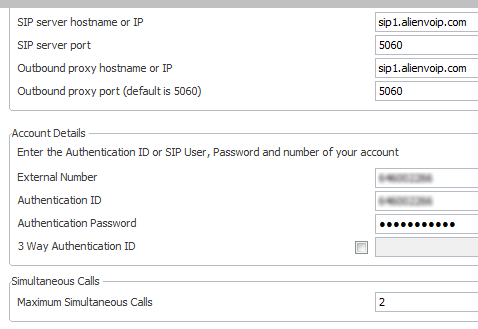
Step 1: Provider Registration
Ensure your SIP provider is registered correctly in the 3CX console.
Step 2: General Settings
Under the “General” tab, configure provider capabilities and registration settings.
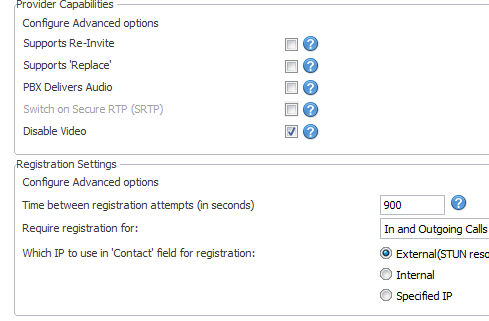
Step 3: Advanced Options
Disable unneeded capabilities and set codec priority: iLBC first, then G.729.

Step 4: Verify Remote Connections
Check that the provider status reads “Registered” before proceeding.

Step 5: Setup Outbound Rules
Create outbound routing logic to match your dial plan requirements.
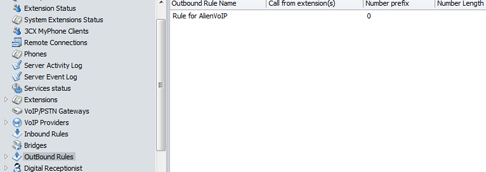
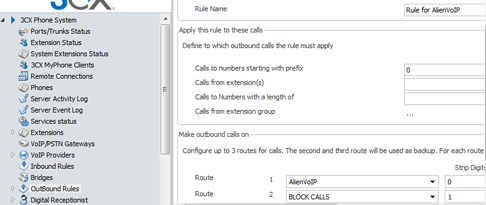
Step 6: Test Outbound Rule
Add a rule to route calls starting with “0” to your Alien VoIP trunk for testing.
Step 7: Extension Registration
Verify your extension appears under “Registered” with no errors.

A Correct 3CX Setup Helps Your Business Avoid Call Issues
A business phone system should be configured properly from the start so your team can make calls, receive calls and manage extensions with fewer disruptions.
Better Call Flow
Configure SIP provider and outbound routing properly so calls can be routed based on your business dial plan.
Reduce Setup Errors
Check general settings, advanced options and extension registration before going live.
Support More Users
Prepare your IP PBX setup for office users, remote users and multiple extensions.
Get Expert Assistance
If you are not sure how to configure 3CX, our team can review your requirement and assist further.
Need Help Setting Up Your 3CX Phone System?
Share your company requirement with us. Our team can help advise the suitable setup flow for SIP provider registration, outbound rules, extensions and IP PBX deployment.
- SIP provider registration and trunk checking
- Outbound rule and dial plan guidance
- Extension registration and remote connection review
Send Us Your 3CX Setup Requirement
To help us recommend the correct setup support, prepare these basic details before requesting assistance.
Share Your Current Setup
Let us know whether you already have 3CX installed, your SIP provider details and current PBX status.
Confirm User Requirement
Share the number of extensions, users, locations, phone devices and call routing requirements.
Get Setup Advice
Our team will review your requirement and advise the next step for 3CX phone system setup support.
Common Questions About 3CX Phone System Setup
These answers help companies understand what to prepare before requesting 3CX setup or IP PBX support.
Can you help set up a 3CX phone system for my company?
Yes. PBX Singapore can assist with 3CX phone system setup guidance, SIP provider registration, outbound rules, extension registration and remote connection checking.
What information should I prepare before asking for 3CX setup support?
You can prepare your company name, number of users or extensions, SIP provider details, current PBX setup, call flow requirement and whether you need remote or on-site support.
Can you help configure outbound rules for 3CX?
Yes. We can help review and configure outbound routing logic based on your dial plan requirements.
Can 3CX connect with Alien VoIP trunk?
Yes. The setup guide includes a test outbound rule to route calls starting with “0” to an Alien VoIP trunk for testing.
Do you provide support after setup?
You may contact PBX Singapore to discuss setup support, troubleshooting and deployment assistance based on your company requirement.