Yealink for Microsoft Teams
Empower your team with certified Teams devices—desk phones, conference phones, speakerphones, headsets, and video bars—featuring Optima HD Voice, Noise Proof Technology, and one-touch Cortana integration.
For Office Teams
Suitable for desk users, support teams, managers, huddle spaces and meeting rooms.
Clear Meeting Audio
Support better Teams calls with HD audio, speakerphones and noise reduction options.
Consult Before Buying
Tell us your room size and usage. Our team will recommend the suitable device setup.
Choose the Right Device for Every Desk, Room and Meeting
From personal desk phones to full meeting room video systems, Yealink Microsoft Teams devices help your team communicate clearly and join meetings more easily.
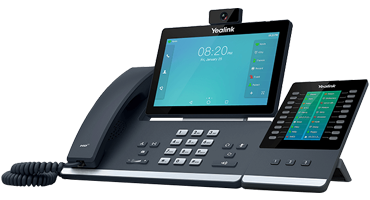
SIP-T58A
Entry-level desk phone ideal for office professionals. Intuitive touchscreen, one-touch meeting join, and HD audio.
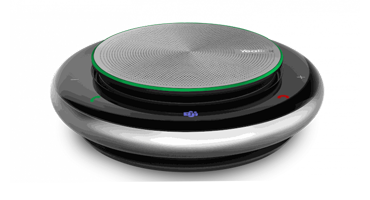
CP900
Portable USB/Bluetooth speakerphone for huddle rooms and on-the-go. Wideband audio and echo cancellation.
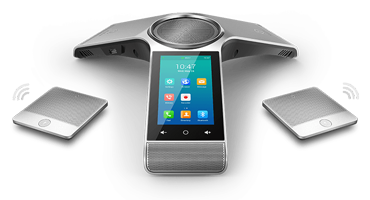
CP960
Conference phone for mid and large meeting rooms. Exceptional audio clarity and full-duplex speakers.
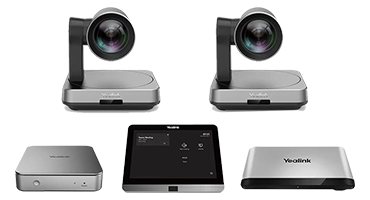
Teams Rooms System
Robust video solution with native Teams experience. Future-proof your meeting rooms with AI-powered Cortana support.
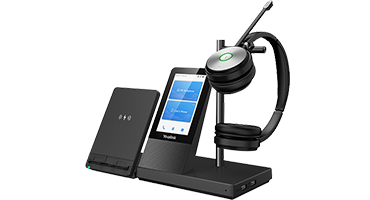
Headsets
Flexible connectivity for PC, smartphone, and desk phone. Intelligent noise reduction and all-day comfort.
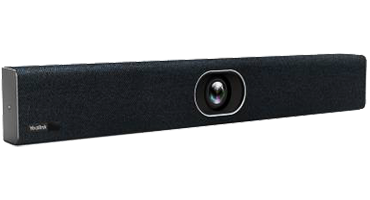
BYOD Kit
All-in-one video and audio for small rooms. Single-cable connection for Teams, Zoom, Skype, and laptop charging.
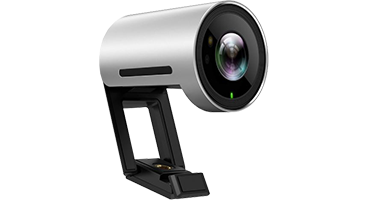
USB Camera
All-in-one AIO USB camera with built-in mic and speaker. Plug-and-play and Wi-Fi enabled for any UC platform.
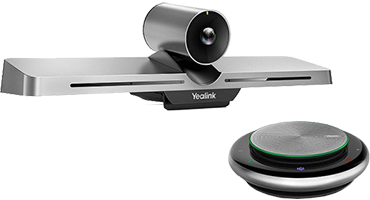
Collaboration Bar
All-in-one video bar for huddle rooms. Seamless plug-and-play with superior video and audio performance.
Designed for Modern Teams Collaboration
Improve daily communication with devices that support office calls, online meetings, hybrid work and meeting room collaboration.
Desk Phone Users
Give office professionals a dedicated Teams desk phone for calls, meetings and daily communication.
Huddle Rooms
Equip small rooms with speakerphones, USB cameras, BYOD kits or collaboration bars for easy meetings.
Meeting Rooms
Use conference phones and Teams Rooms Systems for better audio and video collaboration.
Support Teams
Improve call clarity and comfort for staff who spend more time on calls and online meetings.
Not Sure Which Yealink Teams Device to Choose?
Share your office setup with us and we will help match the suitable Yealink device for your users, meeting room size and collaboration needs.
- Desk phone, speakerphone, headset, camera and room system recommendation
- Suitable setup for small rooms, huddle rooms and conference rooms
- Quotation support for office upgrade and Microsoft Teams deployment
Simple Steps to Get Your Teams Devices
Make your enquiry easier by sharing your office usage, number of users and room requirements.
Share Your Requirement
Tell us whether you need desk phones, headsets, speakerphones, cameras or Teams room devices.
Get Suitable Advice
Our team will review your usage, room size and team setup before recommending the suitable model.
Receive Quotation
We will prepare a quotation based on the selected device, quantity and office requirement.
Common Questions About Yealink Microsoft Teams Devices
Here are some common questions from companies looking for Teams phones and meeting room devices.
Which Yealink Microsoft Teams device is suitable for my office?
It depends on your usage. Desk users may choose SIP-T58A, small meeting rooms may use CP900 or BYOD Kit, while larger rooms may require CP960, Teams Rooms System or Collaboration Bar.
Can Yealink devices support Microsoft Teams meetings?
Yes, the Yealink Microsoft Teams device range is designed for Teams calling, meetings and collaboration use cases, including desk phones, speakerphones, room systems, headsets, cameras and video bars.
Do you provide advice before purchase?
Yes. Our team can help recommend the suitable Yealink Teams device based on your room size, number of users, meeting style and office requirements.
Can these devices be used for huddle rooms and meeting rooms?
Yes. Yealink has options for huddle rooms, small meeting rooms, mid-size rooms and larger conference rooms.
How can I request a quotation?
You can contact PBX Singapore and share your company name, room size, number of users and required device type. Our team will advise the suitable option.